GEO audit: how to check your SaaS brand's AI visibility (2026)
Updated 21 Oct 2026
By Yash Kumar, Co-founder and CEO, Nakama Growth
A GEO audit is a structured check of whether AI answer engines can find, describe and recommend your brand. For a SaaS company, that means testing real buyer prompts in ChatGPT, Perplexity, Google AI Overviews, Gemini, Copilot and Claude, then fixing what blocks you: crawler access, JavaScript-only pages, thin third-party coverage and stale facts.
This guide gives you the full GEO audit for SaaS teams in six steps, plus a copyable checklist, so you can measure AI search visibility for SaaS buyers the same way every month.
Key facts before you start
- ChatGPT search depends on one crawler. Per OpenAI's crawler docs, blocking OAI-SearchBot removes a site from ChatGPT's search answers, leaving it reachable only as a plain navigation link (OpenAI).
- Google needs indexing plus one setting. Pages need to sit in Google's index with snippets allowed, and Google's optimization guide also requires the site to stay opted in to "Search generative AI features" inside Search Console (Google).
- Off-site mentions matter most for Google. In an Ahrefs study of 75,000 brands (May 2025), branded web mentions correlated with AI Overview visibility at 0.664, against 0.218 for backlinks (Ahrefs).
- Bing now reports AI citations. Since a public preview announced on 10 Feb 2026, Bing Webmaster Tools' AI Performance report shows how often your pages are cited in Microsoft Copilot and Bing AI summaries (Bing).
The Ahrefs studies cited here measure correlation. They show patterns and cannot prove cause.
What is a GEO audit?
A GEO audit measures your LLM visibility, meaning how generative engines treat your brand today, and lists the fixes that would improve it. It covers four layers: whether AI tools mention you, whether they cite your pages, whether what they say is accurate, and whether crawlers can read your site at all.
GEO stands for generative engine optimization. For the background on how it relates to SEO and AEO, read our guide to AEO vs SEO vs GEO.
Why does a GEO audit for SaaS need its own process?
SaaS sites break AI visibility in specific ways: pricing loads through JavaScript, docs live on subdomains, trial pages are blocked, and buyers compare tools on G2 and YouTube before they visit your site. Buying is also comparison-heavy, so prompts like "alternatives to [competitor]" shape shortlists, and your audit must test exactly those.
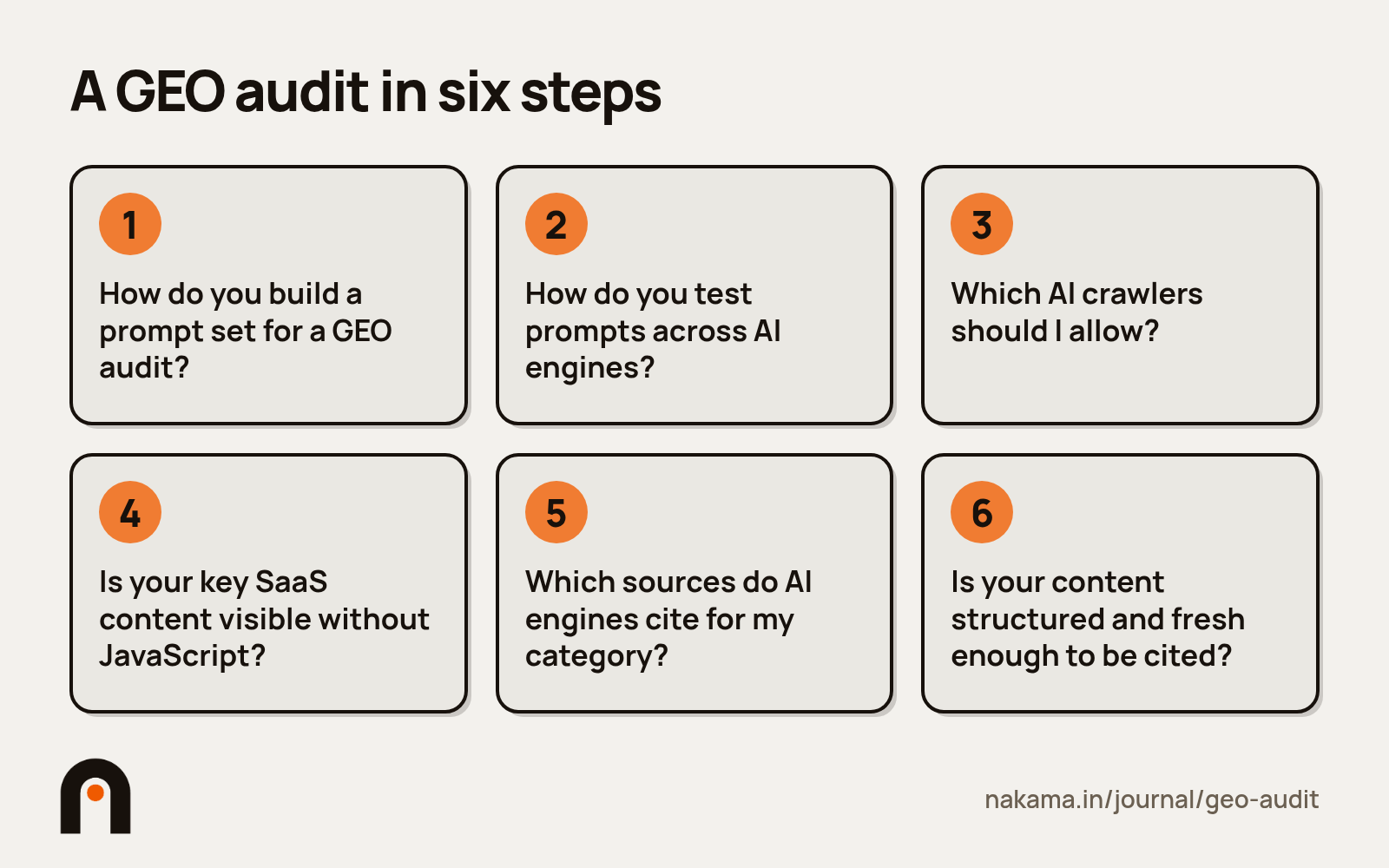
Step 1: How do you build a buyer prompt set?
Start with 20 to 30 prompts your buyers would actually type, grouped by stage: category discovery, comparison, alternatives, pricing and branded. Keep branded prompts in their own group, because AI tools usually know your name when asked directly. The useful signal is in unbranded prompts.
| Stage | Example prompt |
|---|---|
| Discovery | What is the best customer support software for a 50-person SaaS team? |
| Comparison | Is [your brand] or [competitor] better for startups? |
| Alternatives | What are the best alternatives to [competitor]? |
| Pricing | How much does [your brand] cost per seat? |
| Branded | What does [your brand] do? |
Freeze this list. If you change prompts between audits, you cannot tell whether visibility moved or the test moved.
Step 2: How do you test prompts across AI engines?
Ask every prompt seven or more times on each engine, in fresh sessions with no chat history (logged out where the engine allows it), and record the date of every run. Report each engine on its own line with run counts, such as "named in 2 of 7 ChatGPT runs, 14 to 21 Oct 2026". Never add engines together into one score.
The reason is variance. In a 2026 University of St. Gallen study, only 34% to 42% of cited sources overlapped from one day to the next, and the authors set seven daily repeats of each prompt as the minimum for tracking brands (Schulte et al.). The study used Swiss-German prompts and suggests at least 8 runs when you track cited sources, so treat 7 as a floor.
For each run, log six fields: whether your brand is mentioned, whether it is recommended, whether your URL is cited, whether price and features are accurate, which competitors appear, and which source domains the engine cites. For an example of the output this step should produce, see our post on what a useful visibility report shows.
How do I track Google AI Overviews?
Search each prompt in Google and record whether an AI Overview appears at all. Many queries show none: a study of 55,393 trending Google queries (March to April 2026) found AI Overviews on 13.7% overall and 64.7% of question-form queries (Xu et al.). Log "no overview" as its own outcome.
Because Google can use "query fan-out" to build one answer from several searches, a page on a narrow subtopic can earn a citation on a broad prompt (Google).
How do I check Perplexity, Gemini, Copilot and Claude?
Run the same prompts the same number of times on each, and record sources wherever the engine shows them. Expect different results per engine. Ahrefs found branded web mentions correlate far less with Perplexity (0.30) and ChatGPT (0.15) visibility, measured across the top 50 domains in each (Ahrefs, Jul 2025).
Is a citation proof that the page supports the answer?
No. Check the cited page yourself. In the same AI Overviews study, 11.0% of 98,020 claims were unsupported by the pages cited for them (Xu et al.). If an engine cites your page for a wrong claim, log it as an accuracy issue.
Step 3: Which AI crawlers should I allow?
Allow the search crawlers for every engine you want to appear in, and decide the training crawlers by policy. Then confirm in your robots.txt and your CDN or firewall rules that those crawlers get a 200 response on key pages. One blanket bot rule can remove you from ChatGPT, Perplexity or Claude search.
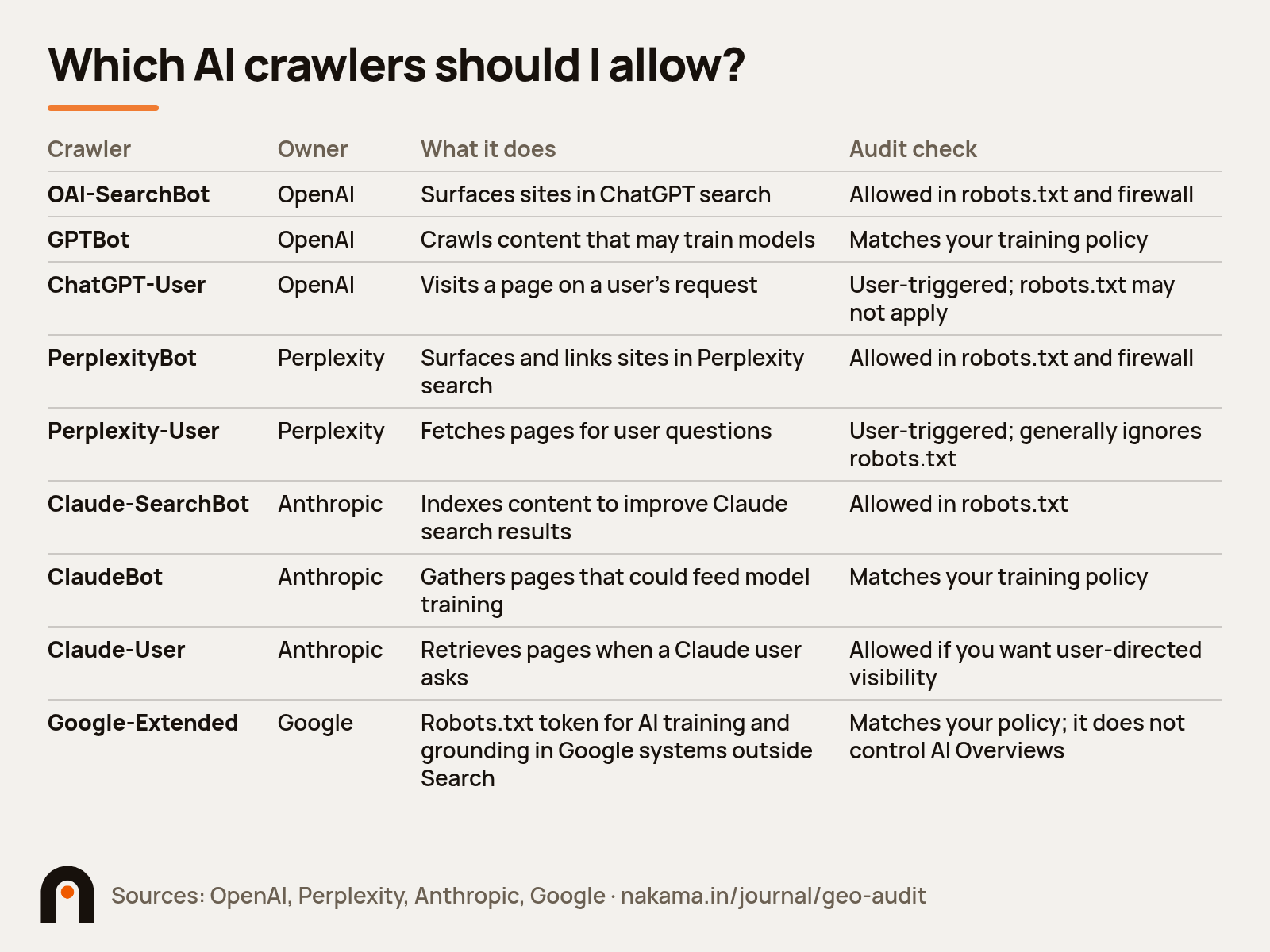
| Crawler | Owner | What it does | Audit check |
|---|---|---|---|
| OAI-SearchBot | OpenAI | Surfaces sites in ChatGPT search | Allowed in robots.txt and firewall |
| GPTBot | OpenAI | Crawls content that may train models | Matches your training policy |
| ChatGPT-User | OpenAI | Visits a page on a user's request | User-triggered; robots.txt may not apply |
| PerplexityBot | Perplexity | Surfaces and links sites in Perplexity search | Allowed in robots.txt and firewall |
| Perplexity-User | Perplexity | Fetches pages for user questions | User-triggered; generally ignores robots.txt |
| Claude-SearchBot | Anthropic | Indexes content to improve Claude search results | Allowed in robots.txt |
| ClaudeBot | Anthropic | Gathers pages that could feed model training | Matches your training policy |
| Claude-User | Anthropic | Retrieves pages when a Claude user asks | Allowed if you want user-directed visibility |
| Google-Extended | Robots.txt token for AI training and grounding in Google systems outside Search | Matches your policy; it does not control AI Overviews |
Sources: OpenAI, Perplexity, Anthropic, Google.
Anthropic warns that disabling Claude-SearchBot may reduce your visibility in Claude search results. If your SaaS site sits behind Cloudflare or AWS WAF, check firewall logs for blocked requests from these agents and verify them against each vendor's published IP lists.
For Google, open Search Console Settings and confirm the site is opted in to Search generative AI features. Then look for stray nosnippet or max-snippet tags, which Google lists as controls that limit what appears in AI features.
Step 4: Is your key SaaS content visible without JavaScript?
View the raw HTML of your homepage, pricing, feature and comparison pages, or run curl on each URL and search the output for your plan prices. If prices, plan names, feature lists or FAQs only appear after JavaScript runs, some AI crawlers may never see them. Server-render or pre-render anything you want quoted.
Google recommends keeping important content available in textual form (Google). For SaaS, the usual culprits are:
- Pricing toggles (monthly or annual) that inject numbers with JavaScript
- Feature comparison grids built as interactive widgets
- Docs and changelogs on a separate subdomain with weak internal links
Step 5: Which sources do AI engines cite for my category?
List the domains the engines cited in Step 2 for prompts where you lost. Then check whether your brand appears on those pages, and whether the description matches your current product. Third-party coverage is often the largest gap the audit finds.
The off-site sources to check for a SaaS brand:
- Review platforms: G2, Capterra and TrustRadius profiles, with current pricing and categories
- YouTube: demos, tutorials and comparison videos that name your product
- Roundups: "best X tools" listicles that engines cite repeatedly
- Profiles: LinkedIn, Crunchbase and your about page, with one consistent category description
- Reddit and forums: check these only if Step 2 shows an engine citing them for your prompts, since citation sources differ by engine
In a December 2025 Ahrefs study, YouTube mentions had the strongest correlation with AI visibility (about 0.737), while a site's page count showed almost none (about 0.194) (Ahrefs). Fix wrong facts at the source: if G2 shows last year's pricing, AI answers may repeat it.
Step 6: Is your content structured and fresh enough to be cited?
Check that each priority prompt maps to one page that answers it in the first two sentences, with question-style headings, a visible update date that reflects real edits, and specific numbers with a named source. Add Organization schema with correct sameAs links as hygiene, and use FAQ markup only where it matches the visible text word for word.
As a working guideline, keep each heading's lead answer between 40 and 60 words. Google states structured data isn't required for its generative AI features (Google), so answers and facts carry the weight. For ChatGPT-specific tactics, read our guide on how to rank in ChatGPT.
How do you measure results over time?
Rerun the same frozen prompt set on the same engines every month, with the same run count, and compare mention, recommendation and citation rates against your baseline. Keep visibility metrics and pipeline metrics in separate columns.
For first-party data, use Google Search Console's Generative AI performance report, which Google recommends for seeing how content performs in its AI features (Google), and Bing's AI Performance report, which shows total citations, cited pages, grounding queries and page-level activity across Copilot and Bing AI summaries (Bing). Treat these counts as directional; the report is still in preview. Our roundup of Peec AI alternatives compares paid trackers.
The GEO audit checklist
Copy this into a sheet and add Pass/Fail, Owner and Due columns.
| # | Area | Check | Pass if |
|---|---|---|---|
| 1 | Prompts | 20 to 30 buyer prompts, grouped by stage | Branded prompts kept separate |
| 2 | Prompts | Prompt list frozen for repeat audits | Same list used each month |
| 3 | Testing | At least 7 dated runs per prompt per engine | Run counts and dates logged |
| 4 | Testing | ChatGPT, Perplexity, AI Overviews, Gemini, Copilot, Claude covered | Each engine reported separately |
| 5 | Testing | Mentions, recommendations, citations and cited domains logged | Separate columns; cited pages checked against claims |
| 6 | Access | OAI-SearchBot, PerplexityBot and Claude-SearchBot allowed | No disallow on key pages |
| 7 | Access | GPTBot, ClaudeBot and Google-Extended rules match training policy | Decision documented |
| 8 | Access | CDN and WAF let AI crawlers through | 200 responses in logs |
| 9 | Access | Key pages indexed in Google and Bing | Confirmed in Search Console and Bing Webmaster Tools |
| 10 | Access | Search generative AI features opt-in on | Checked in Search Console |
| 11 | Access | No accidental nosnippet or max-snippet | Tags reviewed on key pages |
| 12 | Rendering | Pricing, feature lists and FAQs in raw HTML | Text found with curl |
| 13 | Rendering | Docs and changelog linked from main site | Internal links in place |
| 14 | Entity | Same category description everywhere | Site, G2, LinkedIn, Crunchbase match |
| 15 | Entity | Branded AI answers accurate | No wrong prices or features |
| 16 | Sources | Review profiles and YouTube coverage current | Pricing correct; product named in videos |
| 17 | Sources | Presence on top cited roundups checked | Gaps listed with owners |
| 18 | Sources | Forums reviewed only where engines cite them | Based on Step 2 source list |
| 19 | Structure | Each priority prompt maps to one page | Direct answer in first two sentences |
| 20 | Structure | Schema matches visible text | Organization and FAQ validated |
| 21 | Freshness | Visible update dates on key pages | Dates reflect real edits |
| 22 | Measurement | Monthly rerun on the same prompts | Trend sheet updated |
| 23 | Measurement | Search Console and Bing AI Performance reviewed | First-party AI data noted |
Which fixes should SaaS teams do first?
Fix access blockers first, because nothing else works if crawlers cannot read your pages.
- Blockers: robots.txt, firewall rules, the Search Console AI setting, JavaScript-only pricing
- High-intent pages: pricing, comparisons, alternatives, use cases
- Accuracy: outdated descriptions on your site and review profiles
- Coverage: roundups, YouTube and the community sources engines cite for you
- Depth: guides and original data that support the rest
Should you run a GEO audit yourself or hire an agency?
A small team can run a first GEO audit in-house with this checklist and a spreadsheet, which is often the right call for geo for saas startups working from a small set of prompts. An agency helps when you need monthly tracking across many engines, or outreach for third-party coverage your team cannot staff.
If you are comparing partners, our list of the best GEO agencies for SaaS covers what to look for, and our roundup of generative engine optimization agencies covers the broader market.
Nakama Growth is a Delhi-based GEO agency founded in 2026. It works with SaaS and AI companies such as Synup, HubEngage, Inventive AI and StarAgile. Book a GEO audit call with Nakama Growth
FAQ
What is a GEO audit?
A GEO audit is a structured check of how AI answer engines such as ChatGPT, Perplexity, Gemini, Copilot, Claude and Google AI Overviews mention, cite and describe your brand. It also checks whether AI crawlers can access your site and whether your key content is readable without JavaScript.
How long does a GEO audit for SaaS take?
Size a GEO audit for SaaS by its captures: prompts times engines times runs. For example, 25 prompts across 5 engines at 7 runs each is 875 logged answers, before any technical or source checks. Plan time and tooling around that number.
Do I need to block GPTBot to protect my content?
That is a policy choice. OpenAI treats GPTBot (training) and OAI-SearchBot (ChatGPT search) as independent settings. Blocking GPTBot while allowing OAI-SearchBot keeps your pages eligible for ChatGPT search.
Do I need special schema or an llms.txt file for AI Overviews?
Google says no. Its guidance rules out AI text files such as llms.txt and special schema for its generative AI features. What you should verify is the Search Console opt-in for Search generative AI features, plus indexed key pages with snippets allowed.
What tools help with a GEO audit?
A spreadsheet and manual prompt testing are enough for a first audit. Add Google Search Console's Generative AI performance report and Bing Webmaster Tools' AI Performance report for first-party data. Paid AI visibility tools can automate prompt tracking across engines once you know which prompts matter; our Peec AI alternatives roundup compares them.
About the author