How to track brand mentions in AI search,
engine by engine
What are the best ways to track brand mentions in AI search?
Use four methods together, because no single one sees every engine. Prompt sampling shows whether answers name you. Tracking tools repeat that sampling at scale. First-party reports and analytics show the citations and clicks that Google, Microsoft and your own site can count. Log and citation checks show which AI systems fetch your pages and which sources they lean on. Of the six engines covered here, only Google's and Microsoft's public documentation describes a first-party report for site owners. For ChatGPT, Perplexity and the Gemini app, you have to sample.
Is it possible to track brand mentions in AI search?
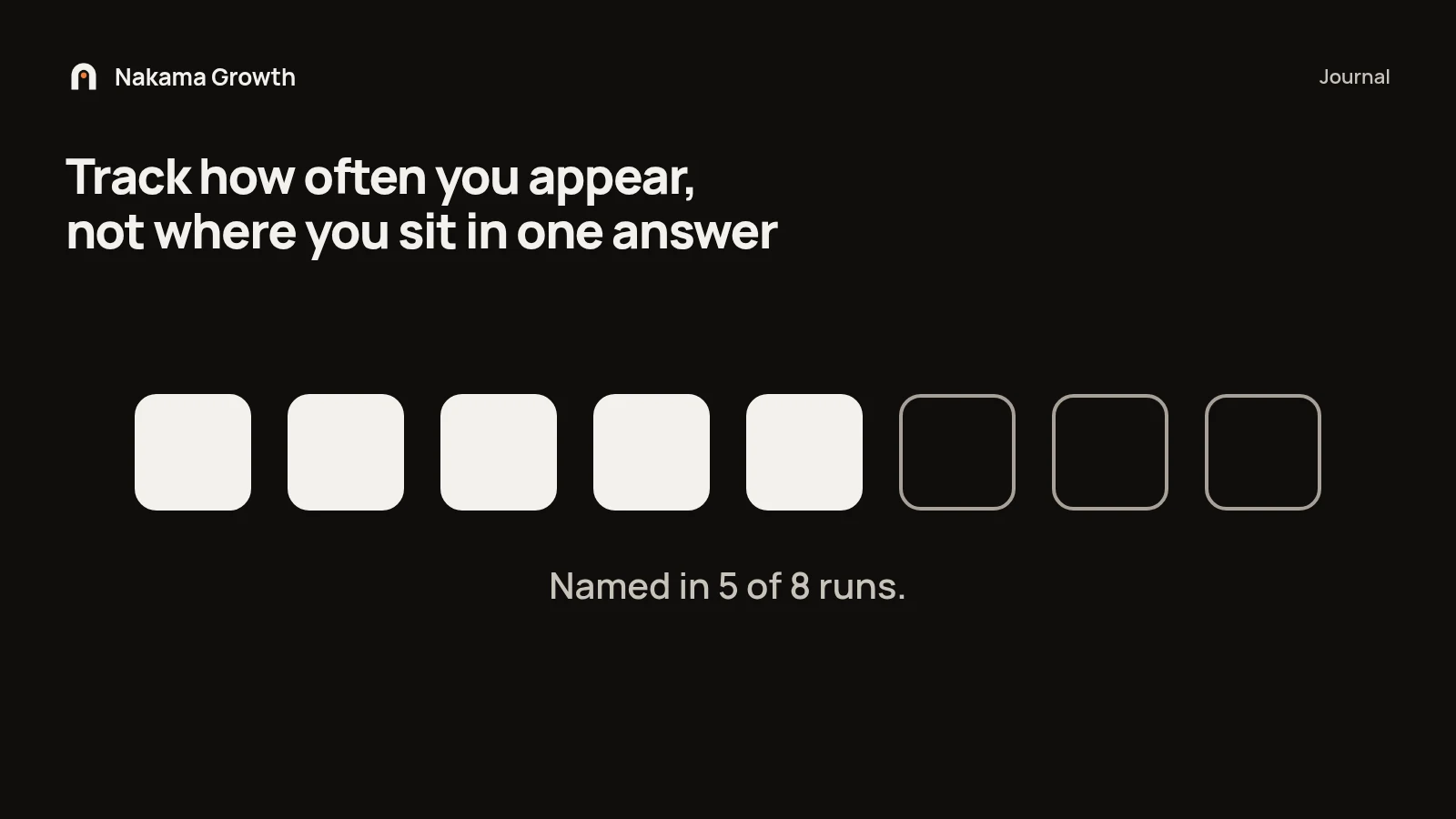
Yes, as a rate across many runs, not as a ranking. Ask the same prompt enough times and you can say how often an engine names you, such as "named in 5 of 8 runs." A single answer cannot tell you that.
SparkToro's research found less than a 1 in 100 chance that ChatGPT or Google's AI returns the same list of brands twice across 100 runs of one prompt. The same work concluded that visibility measured as a percentage across many runs is a reasonable metric, while the order of brands in any one answer is too unstable to treat as a ranking. Track how often you appear, and treat position as secondary. Keep the run count next to any rate, such as 5 of 8, so the sample size stays visible.
Why do AI answers change from run to run?
Two things move at once: the model samples a different answer each time, and the sources it retrieves change from day to day. A University of St. Gallen team ran the same prompts repeatedly on ChatGPT, Gemini, Google AI Mode and Perplexity (Schulte et al., 2026). Cited sources overlapped by only 34% to 42% from one day to the next. Even runs within the same 24 hours overlapped by 32% to 43%, so most of the change comes from the model itself, not from new content on the web.
Brand mentions were steadier than cited URLs in that study, with day-to-day overlap of 45% to 59%. That has a practical meaning: if you can only afford to track one thing, track whether your brand is named, and treat the list of cited URLs as diagnostic detail. The study used Swiss-German prompts on Swiss servers, so treat its numbers as a guide to scale rather than a benchmark for your market.
Which method shows what, on which engine?
Each engine exposes different signals. This table shows where each method works, based on the platforms' own documentation as of 12 November 2026.
| Engine | Prompt sampling | Tracking tools | First-party report | Analytics referral | Log signal |
|---|---|---|---|---|---|
| ChatGPT | Yes | Yes | None | GA4 AI Assistant channel | OAI-SearchBot, ChatGPT-User |
| Perplexity | Yes | Yes | None | Referral from perplexity.ai | PerplexityBot, Perplexity-User |
| Gemini app | Yes | Yes | None | GA4 AI Assistant channel | Not separable from Google crawling |
| Google AI Overviews | Yes, plus "no overview" outcomes | Yes | Search Console | Counted in Organic Search | Googlebot only |
| Google AI Mode | Yes, as its own series | Yes | Search Console | Counted in Organic Search | Googlebot only |
| Copilot | Yes | Yes | Bing Webmaster Tools AI Performance | GA4 AI Assistant channel | Not covered here |
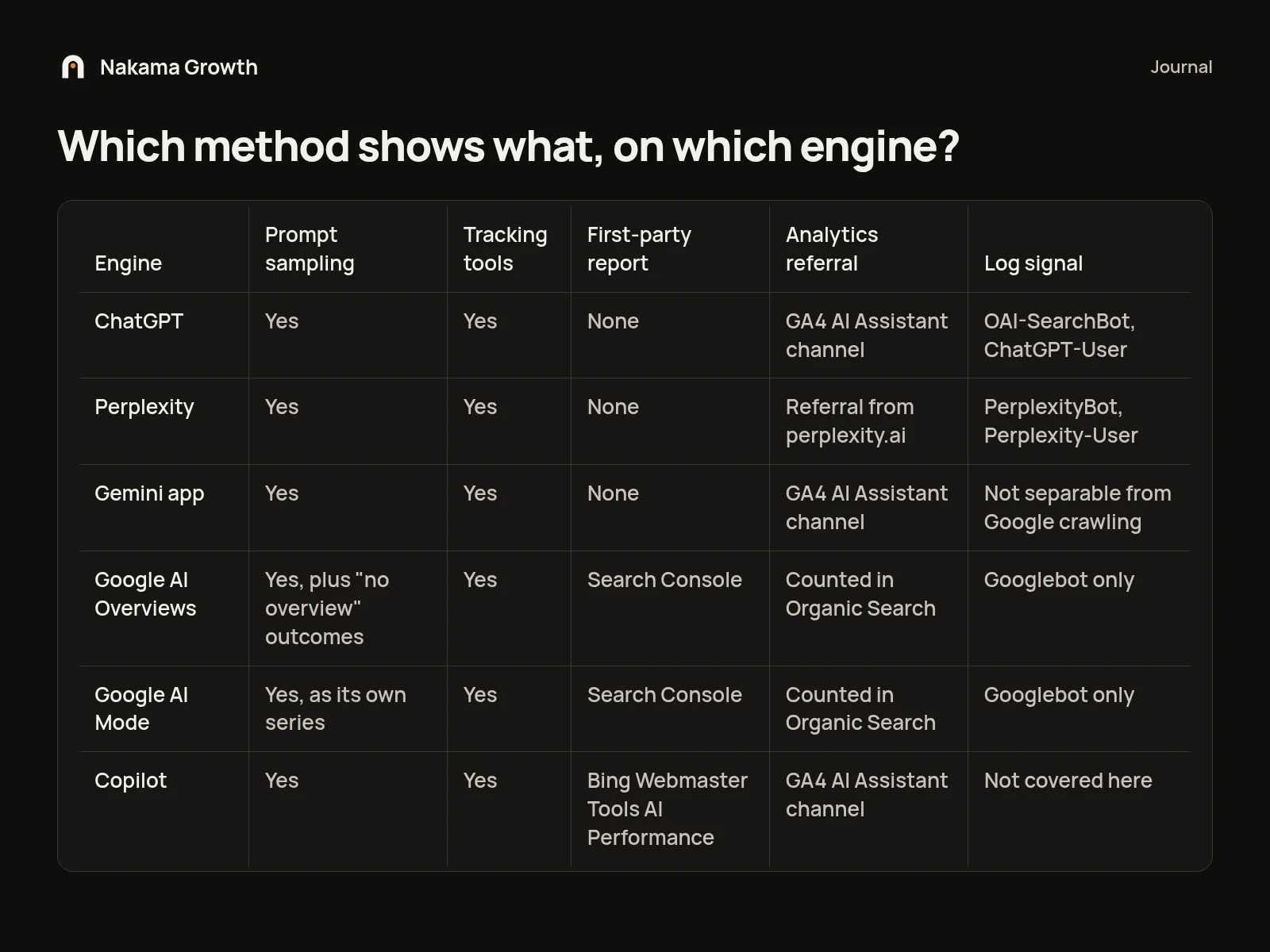
The gap is plain once it is laid out: for three of the six engines, sampling is the only way to see an unlinked mention.
Method 1: How does manual prompt sampling work?
Manual sampling means running a fixed set of buyer prompts in each engine, in fresh sessions, and logging what comes back. It is the only method that works on every engine, and it is free.
What it tells you: whether you are named, recommended or cited, which competitors appear instead, and whether the engine describes you accurately.
What it can't tell you: how many real people saw the answer. You choose the prompts, so the result reflects your prompt list, not actual demand.
How to run it: freeze 10 to 30 unbranded buyer prompts, run each one several times per engine in a fresh, logged-out session where the engine allows it, and log one row per run. Our GEO audit guide sets out the full protocol, and the AI visibility report template gives you the sheet.
Engine notes that change what you log:
- ChatGPT only searches the web for some prompts. In the St. Gallen data, 57.8% of ChatGPT runs returned no citations at all. Log a mention and a citation as separate fields, or you will undercount ChatGPT. Our ChatGPT guide covers the ChatGPT-specific details.
- Google AI Overviews often do not trigger at all. Count a search with no overview separately from one where the overview leaves you out.
- Google AI Mode may use different models from AI Overviews, so the answers and links differ, according to Google's page on AI features and your website. Keep it as a separate series.
- Gemini, Perplexity and Copilot: keep the prompt list and run count identical to the other engines so the series compare. The GEO audit guide above covers what to record for each one. Our Perplexity SEO guide covers the Perplexity-specific details.
Method 2: What can tracking tools add, and what can't they?
Tracking tools automate prompt sampling, usually daily, across several engines. They add scale and history. They do not add certainty.
What they tell you: mention and citation trends across hundreds of prompts, competitor overlap and source domains, without someone running prompts by hand.
What they can't tell you:
- Whether their prompts match what your buyers actually type. Most tools generate or expand prompts, and SparkToro's study found that real people almost never phrase the same intent the same way.
- Anything Google knows internally. Google's guide to generative AI features states that "no third-party tool has access to our internal ranking or AI systems."
Before you buy, ask any tool three questions. How many runs per prompt per engine sit behind each number? Can you see the raw answers? Does it report engines separately? For a comparison of the tools themselves, see our AI visibility tools guide.
Method 3: What do first-party reports and analytics show?
First-party data shows the citations and clicks that platforms and your own analytics can count, and nothing else. It is the most trustworthy data you will get, and it covers only part of the picture.
Google AI Overviews and AI Mode. Google's guide points site owners to a Generative AI performance report in Search Console for its generative AI features on Search and Discover. Its AI features page also says clicks from AI Overviews and AI Mode are counted in the Performance report under the "Web" search type. Check which view your property shows; our AI Overviews guide covers reading it. Like the rest of Search Console, it reports on your own pages, so a mention of your brand with no link to your site will not show there.
Copilot. The AI Performance report in Bing Webmaster Tools shows total citations, cited pages, page-level citation counts and the grounding queries behind them, across Microsoft Copilot, AI summaries in Bing and some partner experiences. Microsoft states the data is a sample, "not a complete log", and that very low citation activity may not appear. A preview Citation Share view shows your share of the citations for a grounding query, but it does not name the other sites. Microsoft is also clear that a citation is not a click.
ChatGPT, Gemini and Copilot clicks in GA4. Google Analytics has an AI Assistant default channel for visits from sources such as ChatGPT, Gemini, Deepseek, Copilot and Grok. It excludes AI Overviews and AI Mode, which Google counts under Organic Search. So a GA4 report on "AI traffic" leaves out Google's own AI features unless you add Search Console. Some ChatGPT clicks also arrive with no referrer and show up as Direct, which our ChatGPT guide explains.
ChatGPT Business Hub. Businesses that claim their profile in ChatGPT now get a first-party report from OpenAI: mentions, website clicks and discovery topics over the past 28 days. For an online business, a mention counts only when ChatGPT references its website, so unlinked brand mentions still need prompt sampling. Our ChatGPT Business Hub guide covers claiming a profile and reading the numbers.
What it can't tell you: anything about answers that mention you without a click or a link. Analytics counts visits, and the platform reports count citations of your pages.
Method 4: What can log and citation checks reveal?
Server logs show which AI systems fetched your pages, and citation checks show which sources an engine relied on. Neither one is a mention count, but both explain why mentions move.
Logs. OpenAI documents two agents worth separating: OAI-SearchBot crawls to surface sites in ChatGPT search, and ChatGPT-User visits a page when someone asks ChatGPT a question. Perplexity's crawler documentation makes the same split: PerplexityBot indexes for search, and Perplexity-User fetches a page in response to a user's question and may link it in the answer. A rise in the user-triggered agents on a page is a hint that the page is being used in live answers.
For Google, logs cannot separate AI features from search. Google's AI features page says robots.txt rules for Googlebot are the control for how sites are crawled for Search, AI included, so there is no separate AI Overviews crawler to watch.
Citation checks. Open the URLs each engine cites for your priority prompts. Note which third-party pages name you, which name only competitors, and whether the cited page actually supports what the answer says. This turns a mention rate into a list of pages to earn or fix.
What it can't tell you: whether a fetch led to a mention. A page can be fetched and not used, and your brand can be named from a page you do not own.
How often should you sample?
Run prompts in batches of at least 7 runs per prompt per engine, and read the results over a rolling two to four weeks. In the St. Gallen data, a single run was "essentially uninformative." The standard error on a brand's detection rate fell below 0.10 at 7 runs, and cited-source coverage needed 8 runs to reach similar precision. Across days, the standard error of a per-brand estimate fell below 0.05 at 24 days of daily data, which is why the authors recommend two-to-four-week rolling windows.
A practical schedule for a small team:
- Prompt sampling: one batch of 7 or more runs per prompt per engine, weekly or monthly, always with the same frozen prompt list.
- First-party reports: check Search Console and Bing Webmaster Tools weekly. Bing refreshes its AI Performance data daily.
- Analytics and logs: review monthly, and annotate any known tracking breaks.
What should you log on each run?
Log three yes or no fields per run: whether you were mentioned, whether you were recommended, and whether your site was cited. Report each as a count with the runs behind it, such as "mentioned in 4 of 7 Perplexity runs," and report engines separately rather than adding them into one score. The report template linked above turns those rows into a monthly score. If you also log position, average it across runs rather than reading it from one answer.
Should you track brand mentions yourself or get help?
Track it yourself if you can keep a frozen prompt list and log runs consistently every period. Get help when you need many prompts across several engines, or when you need someone to turn the results into fixes.
If you want to see where you stand first, request a Free AI visibility check: one to three prompts, two engines, three runs each, checked by a person and emailed. Our AI visibility audit runs at least 7 dated runs per prompt per engine and adds a source map and a fix list.
FAQ
Can Google Search Console show brand mentions in AI Overviews?
Only when the mention comes with a link to your site. Search Console reports on your own pages, so it can show clicks and impressions from Google's AI features, but it cannot show an AI Overview that names your brand without linking to you. Use prompt sampling for unlinked mentions.
Can GA4 show when ChatGPT mentions my brand?
No. GA4 counts visits, not mentions. Its AI Assistant channel shows clicks from sources such as ChatGPT, Gemini and Copilot, but an answer that names your brand without a click leaves no trace there. Use prompt sampling to count mentions.
Do I need a paid tool to track brand mentions in AI search?
No. A frozen prompt list, a spreadsheet and fresh sessions are enough to start. A tool becomes worth paying for when you track many prompts across several engines and want daily history. Check how many runs sit behind each number before you trust it.
Why does my brand appear in one ChatGPT answer and not the next?
Because AI answers are sampled, not fixed. The same prompt can return a different set of brands and sources minutes apart, and ChatGPT does not search the web for every prompt. Judge your visibility by how often you appear across many runs, not by a single answer.
About the author